In today's fast-paced business world, efficient communication is crucial. But managing multiple email threads and keeping everyone informed can be time-consuming and cumbersome.
This is where ImprovMX's innovative multi-recipient email alias feature comes in. It allows you to send a single email to a group of people using a single alias, streamlining communication and saving you valuable time.
How it works
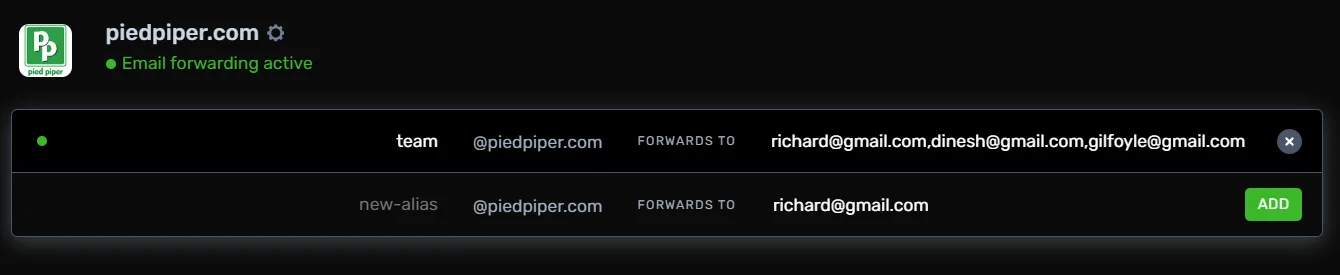
ImprovMX's email aliases act as virtual mailboxes. You can create an alias
with a specific name (e.g., team@piedpiper.com) and configure
it to forward emails to multiple recipients. When you send an email to the
alias, it's automatically distributed to everyone on the list, ensuring
everyone stays informed and on the same page.

Benefits of using ImprovMX's multi-recipient feature
- Streamlined communication: Eliminate the need to send individual emails to multiple recipients. A single email to the alias reaches everyone efficiently.
- Improved collaboration: Foster better teamwork by ensuring everyone on a project or team receives the same information simultaneously.
- Reduced clutter: Keep your inbox organized by sending group emails through a designated alias, instead of individual threads cluttering your inbox.
- Scalability: Easily add or remove recipients from an alias as your needs evolve.
- Flexible for growing teams: Start with up to 5 recipients per alias on the free plan, with the option to increase limits on our business plans (subject to review).
ImprovMX: The perfect solution for efficient team communication
ImprovMX's multi-recipient email alias feature is a powerful tool that simplifies communication, boosts collaboration, and saves you time.
Ready to experience the benefits of ImprovMX for yourself? Sign up for free today and see how it can transform your team's communication!
For a more in-depth explanation of this feature, check out our knowledge base article.

Antoine Minoux
ImprovMX founder and software designer. Now running Fernand (getfernand.com)